A Mind-blowing Hidden Tool Create Custom Map Art for Etsy: A Complete Tutorial (2026)
Learn how to design beautiful, personalized map prints using free tools — and sell them as digital downloads on Etsy. No design experience required. Step-by-step guide included.
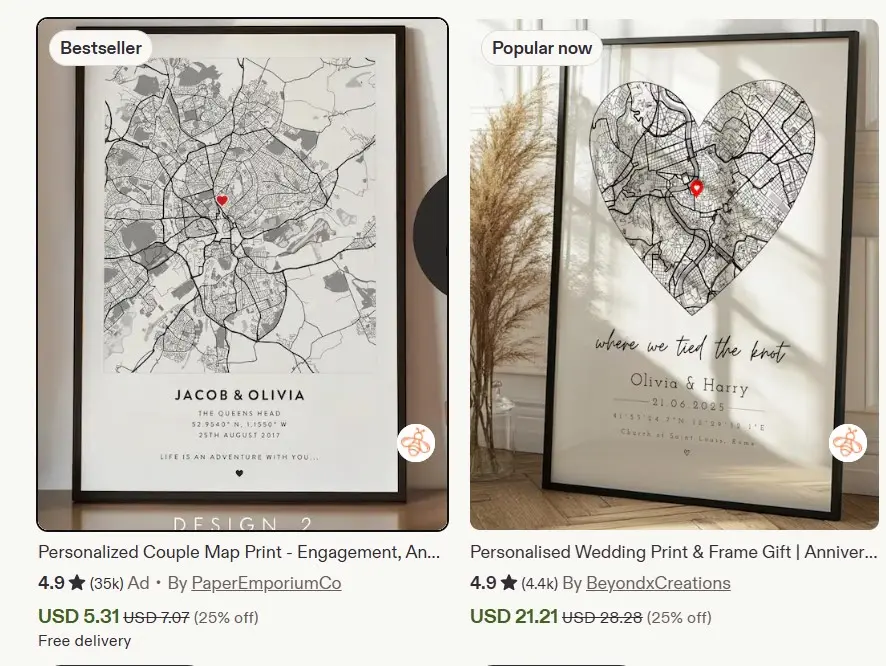
If you’ve ever browsed Etsy searching for “first date map” or “wedding location print,” you know these custom map designs are everywhere.
And for good reason: they’re meaningful, personalized, and perfect for anniversaries, engagements, and special memories.
But here’s what most people don’t realize:
You can create these exact same maps — for free — and sell them as digital downloads.

In this guide, I’ll show you:
- The exact free tool professional sellers use to create custom maps
- How to customize colors, layouts, markers, and text
- Step-by-step instructions to design your first map in under 10 minutes
- How to sell on Etsy or offer as a freelance service
- Real examples of what’s selling right now
No design skills. No expensive software. Just a simple process anyone can follow.
Let’s get started.
Why Custom Map Art Sells So Well on Etsy
Before diving into the tutorial, understand why this niche is so profitable:
| Reason | Explanation |
|---|---|
| Emotional value | Maps mark meaningful locations: where couples met, got engaged, or married |
| Personalization | Each print is unique to the buyer’s story |
| Digital delivery | No inventory, no shipping — instant download after purchase |
| High perceived value | Buyers pay $15–$40 for files that cost you nothing to reproduce |
| Evergreen demand | Weddings, anniversaries, and Valentine’s Day drive year-round sales |
Real example: Search “first date map” on Etsy and you’ll find thousands of listings with hundreds — sometimes thousands — of reviews. These aren’t flukes. They’re proof of consistent demand.

The Free Tool You Need: Terrink.app
Website: Terrink.app
Terrink is a free, browser-based map generator that lets you create stunning, customizable map prints of any location in seconds.
What You Can Do with Terrink:
- Generate maps of any city, town, or specific address worldwide
- Customize color themes (minimalist, neon, rustic, copper, and more)
- Adjust layout dimensions (A3, A4, Instagram square, LinkedIn post, etc.)
- Add custom text, quotes, and location names
- Place markers (hearts, pins, custom icons) to highlight special spots
- Toggle map layers (buildings, roads, water, parks)
- Download in PNG, PDF, or SVG format — completely free
No watermarks. No registration required. No hidden fees.
Step-by-Step Tutorial: Create Your First Custom Map
Follow these exact steps to design a professional-looking map print.
Step 1: Choose Your Location
- Go to Terrink.app
- In the search bar, type your city or location (e.g., “New York, United States”)
- Select the correct result from the dropdown
- Your map loads instantly
Pro tip: You can also click “Get My Location” to auto-detect your current position.
Step 2: Customize the Color Theme
On the left panel, find the Theme section.
Popular options include:
- Minimalist (clean, black and white)
- Neon (vibrant, modern)
- Coral (warm, romantic)
- Copper Rustic (vintage, elegant)
- Blue Sage (calm, sophisticated)
Real example: For a wedding anniversary map, “Copper Rustic” or “Blue Sage” performs well. For a fun “first date” print, try “Neon” or “Coral.”
Step 3: Set Your Dimensions
Still in the left panel, find Layout.
Choose from:
- A3 Portrait (297 x 420 mm)
- A4 Portrait (210 x 297 mm)
- Instagram Square (1080 x 1080 px)
- Instagram Portrait (1080 x 1350 px)
- LinkedIn Post (1200 x 627 px)
- Pinterest Pin (1000 x 1500 px)
- Twitter Header (1500 x 500 px)
- Custom dimensions
Best for Etsy: A3 or A4 portrait formats are most popular for printable wall art.
Step 4: Add Custom Text
Below the location name, you’ll see editable text fields.
Default text: “New York City” and “United States”
Customize it to:
- “Where It All Began”
- “Our First Date”
- “June 15, 2019”
- “Forever Starts Here”
- A romantic quote or personal message
Font customization: Click the font dropdown to choose from dozens of typefaces. Match the style to your theme (elegant script for weddings, bold sans-serif for modern designs).
Step 5: Toggle Map Layers
Find the Layers section to control what appears on your map:
- Water
- Parks
- Roads
- Rail stations
- Airways
- Buildings
Best practice: For a clean, aesthetic look, uncheck most layers. Let the map streets and shape speak for themselves. Too many details can clutter the design.
Step 6: Adjust Zoom Level
Use the zoom slider to get closer or farther from your location.
Tip: Zoom in enough to show neighborhood detail, but not so close that the map loses context. For city-wide memories (like “where we met”), a wider view works better. For specific venues (a restaurant or park), zoom in closer.
Step 7: Add Markers (The Special Touch)
This is where your map becomes truly personalized.
- Click Markers in the left panel
- Choose an icon: heart, home, circle, square, or upload custom SVG
- Place it on the exact spot you want to highlight
- Customize:
- Size (bigger for emphasis)
- Color (red for romance, gold for elegance)
- Style (filled or outlined)
Advanced move: Upload your own custom marker icon.
How to find free icons:
- Go to Public Domain Vectors
- Search for “heart,” “location pin,” or “wedding”
- Download an SVG or PNG
- Upload to Terrink in the marker section
Real example: For a “first date” map, place a heart marker on the restaurant or coffee shop where the couple met.
Step 8: Download Your Map
When you’re satisfied with the design:
- Click Download in the top right
- Choose your format:
- PNG (best for digital downloads, high-quality images)
- PDF (ideal for print-ready files)
- SVG (vector format, scalable without quality loss)
- Click download — your file saves instantly
Recommended for Etsy: Offer both PNG (for easy printing) and PDF (for professional print shops) formats.
How to Sell Custom Maps on Etsy
Now that you know how to create the maps, here’s how to turn them into income.
1. Set Up Your Etsy Shop
If you don’t have one yet:
- Go to Etsy.com/sell
- Create your shop (takes 10–15 minutes)
- Set up payment and billing
Cost: $0.20 per listing (lasts 4 months or until sold)
2. Create Your Listing
Title example:
“Custom First Date Map Print | Personalized Anniversary Gift | Where We Met Map | Digital Download”
Description should include:
- What the buyer receives (file formats, sizes)
- How to order (they provide location, date, custom text)
- Processing time (usually 24–48 hours for custom work)
- How to download and print
Pricing:
- Basic map: $4–$18
- Premium package (multiple sizes + commercial license): $25–$35
- Rush delivery add-on: +$5–$10
3. Show Examples in Your Listing Photos
Create 5–7 mockup images showing:
- Different color themes
- Various occasions (wedding, anniversary, first date)
- Size comparisons (A4 vs. A3)
- Framed mockups (use free tools like Canva or Smartmockups)
Pro tip: Order a cheap frame from Amazon or use free mockup templates to show how the print looks on a wall.
4. Optimize for Etsy SEO
Use relevant keywords in:
- Title: “Custom Map Print,” “Personalized Anniversary Gift,” “First Date Map”
- Tags (13 available): “anniversary gift,” “wedding map,” “custom location print,” “digital download,” “personalized map,” etc.
- Description: Naturally include phrases buyers search for
Research tool: Use Erank or Marmalead to find high-volume, low-competition keywords.
5. Deliver the Custom File
When someone purchases:
- Message them asking for:
- Exact location (address or landmark)
- Date or custom text
- Color theme preference
- Any special requests
- Create the map using Terrink (takes 5–10 minutes)
- Send the file via Etsy’s digital download system or direct message
- Include a thank-you note and printing instructions
Turnaround time: Most sellers deliver within 24–48 hours.
Alternative: Offer as a Freelance Service
Don’t want to manage an Etsy shop? Offer custom map design as a service.
Platforms to use:
| Platform | How It Works | Link |
|---|---|---|
| Fiverr | Create a gig: “I will design a custom map print for your special occasion” | Fiverr.com |
| Upwork | Bid on projects seeking graphic design or custom print work | Upwork.com |
| Post examples, use hashtags like #custommapprint #anniversarygift | Instagram.com | |
| Create pins linking to your Etsy shop or contact form | Pinterest.com |
Pricing for freelance:
- Single map: $15–$30
- Package (3 maps): $40–$60
- Rush delivery: +$10
Real Examples of What’s Selling Right Now
Based on current Etsy trends, these map types perform best:
| Occasion | Popular Text | Best Color Theme | Price Range |
|---|---|---|---|
| First Date | “Where It All Began” + date | Minimalist, Neon | $5–$20 |
| Wedding | “Mr. & Mrs.” + venue location | Copper Rustic, Blue Sage | $4–$25 |
| Anniversary | “X Years Together” + location | Elegant script, gold tones | $5–$30 |
| Long Distance | Two locations connected | Dual-tone, modern | $4–$28 |
| New Home | “Home Sweet Home” + address | Minimalist, warm tones | $5–$22 |
| Memorial | “In Loving Memory” + special place | Soft, muted colors | $15–$25 |
Pros and Cons of Selling Custom Map Art
Pros
- Zero inventory: Digital files mean no storage or shipping costs
- High profit margins: After the $0.20 listing fee, nearly 100% profit
- Scalable: Create one design, sell it infinitely
- Quick turnaround: Most maps take 5–10 minutes to customize
- Emotional product: Buyers value sentiment, which justifies higher prices
- Free tools: Terrink is completely free — no software costs
Cons
- Competitive niche: Many sellers offer similar products
- Custom work required: Each order needs individual attention (unless you sell pre-made templates)
- Customer service: You’ll handle questions, revisions, and technical issues
- Platform fees: Etsy takes 6.5% transaction fee + payment processing fees
- Trend-dependent: Demand spikes around Valentine’s Day, anniversaries, wedding season
Tools and Resources
Map Creation
- Terrink.app – Free custom map generator (main tool)
- Public Domain Vectors – Free icons and graphics
Design & Mockups
- Canva – Create listing photos and mockups (free)
- Smartmockups – Professional product mockups
- Placeit – Mockup generator (freemium)
Etsy Optimization
Freelance Platforms
- Fiverr – Sell map design services
- Upwork – Find custom design clients
- Instagram – Showcase portfolio and attract buyers
Your 7-Day Launch Plan
| Day | Task | Outcome |
|---|---|---|
| Day 1 | Create 5 sample maps (different themes, occasions, colors) | Portfolio ready |
| Day 2 | Set up Etsy shop or Fiverr gig | Sales platform live |
| Day 3 | Design listing photos with mockups | Professional presentation |
| Day 4 | Write SEO-optimized titles, descriptions, and tags | Search visibility |
| Day 5 | Publish 3–5 listings (different occasions) | Multiple revenue streams |
| Day 6 | Share on Pinterest, Instagram, or Facebook groups | Initial traffic |
| Day 7 | Respond to inquiries, fulfill first orders | First sales momentum |
Final Thought: Start Simple, Scale Smart
You don’t need 50 listings on day one.
You need:
- One great sample map
- One clear listing
- One satisfied customer
That’s it.
From there, you’ll learn what buyers want, which themes sell best, and how to streamline your process.
The barrier to entry is low. The tools are free. The demand is real.
Your only job is to start.
Go to Terrink.app right now. Create your first map. Screenshot it. That’s your first product.
Everything else is optimization.
Ready to Turn Digital Products Into Consistent Sales?
If you want a proven framework for:
- Creating digital products people actually buy
- Writing listings that convert browsers into buyers
- Driving traffic without paid ads
- Scaling from first sale to consistent income
I break down my exact system inside Digiplaybook — the same framework I use to launch and monetize digital products without guesswork.
Get instant access: HiddenEarn.com/digiplaybook